 Homelab Hand
 Updates
OS, Proxmox and container image updates in one place, with schedules and history.
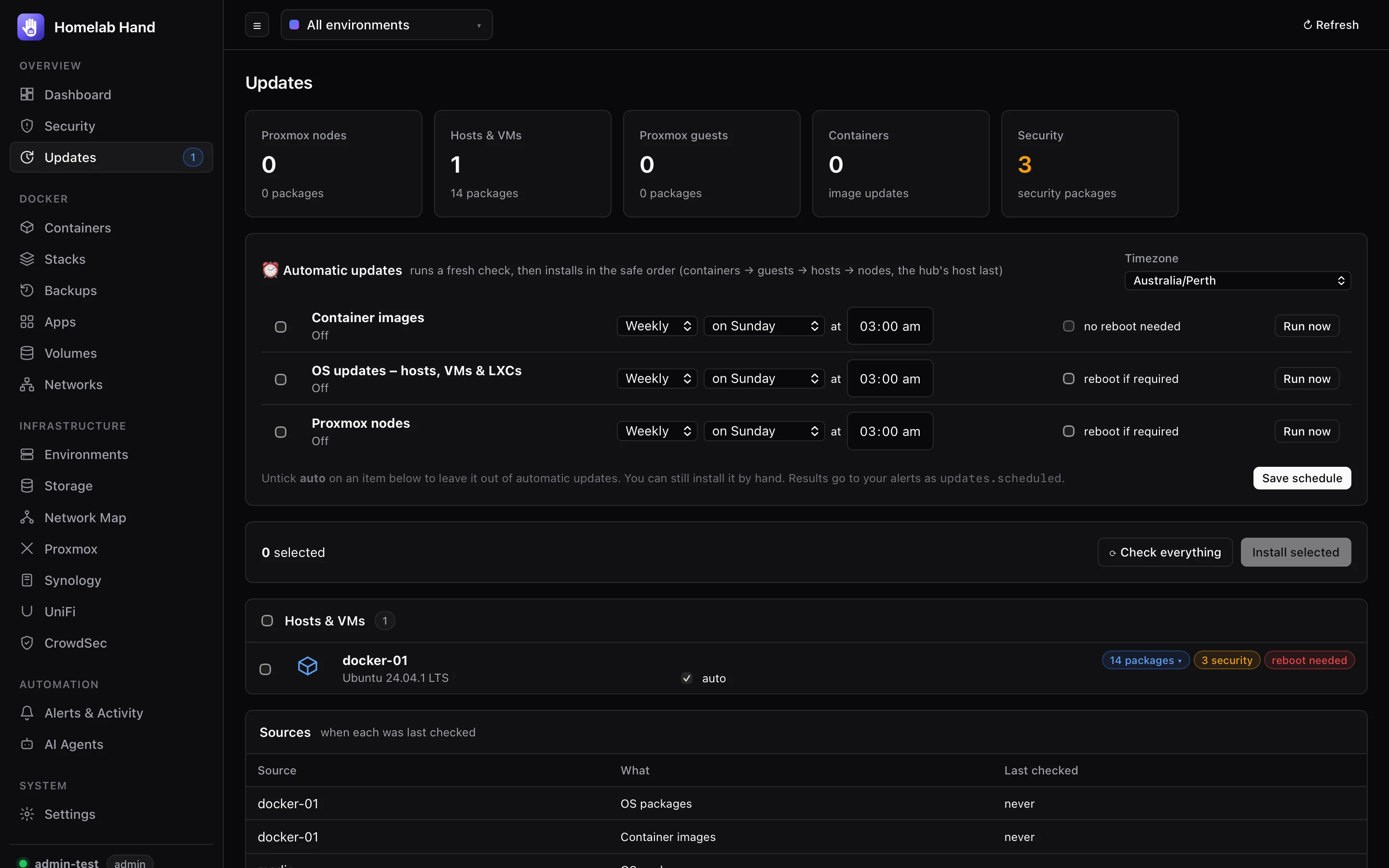
The Updates page brings together Proxmox node packages, OS packages on hosts, VMs and LXCs, and container image updates. Tick any mix (or a whole section) and press Install selected. It runs as one job with live output.
Reading the page
- Stat cards filter by type, or show only Security updates.
- Package details: click a machine's N packages › (or N security ›) badge to see every pending package, with its installed and new version and its source repository. Security updates come first, with search and a security-only filter.
- Sources table: when each source was last checked, and any errors. Check everything re-checks them all.
- Proxmox guests that are also environments are listed once, under Hosts & VMs.
- The sidebar badge shows how many items have updates.
How installs run
- Safe orderContainers → Proxmox guests → hosts → Proxmox nodes. The environment running the hub (badge hub) always goes last.
- Detached on the machineOS upgrades run detached on the machine itself, logging to
/var/log/homelab-hand-update.log, which is tailed live into the job. They finish even if the connection drops, for example when upgradingdocker-cerestarts Docker and the hub with it. - Containers come backUpgrading
docker-ceorcontainerdrestarts Docker. Containers with restart policyalwaysorunless-stoppedcome back by themselves, but ones withon-failureor no policy would stay stopped. So the update notes which containers were running beforehand, and afterwards starts any of them that didn't come back. Each one is named in the install log. - Repairs firstOn apt systems, a half-finished earlier run is repaired first (
dpkg --configure -a,apt-get -f install). - Proxmox guestsLXCs and VMs are updated through the Proxmox link (
pct exec/ guest agent) rather than Docker, because that survives Docker restarts.
Automatic updates
Three schedules sit at the top of the page: container images, OS updates (hosts, VMs and LXCs) and Proxmox nodes.
- When: daily, weekly (pick the day) or monthly (pick the date), at a time in your timezone.
- What a run does: a fresh check, then installs what that schedule covers, in the safe order. Optionally it then reboots machines that report needing it, with the hub's own host last.
- Missed slots (while the hub was down) aren't run late, and changing the time doesn't trigger a run straight away.
- Opting out: untick auto on any item to leave it out. You can still install it by hand.
- Run now runs a schedule immediately. Results are sent as
updates.scheduledalerts.
Rebooting a Proxmox node restarts everything on it. Leave reboot off for the node schedule unless your guests start automatically and you're happy with the downtime.
Update history
The 🕘 History button lists every install. That includes installs by hand (Updates page, environment page, Proxmox guest, a single container) and by schedule. Each entry shows:
- what was updated (old → new version for every package or image);
- the result, who or which schedule ran it, and how long it took;
- the full install log.
Filter by machine, by OS packages vs container images, and by result.
Enabling OS updates on Proxmox
On the Proxmox page, Enable updates on a node card creates an SSH environment for the node using the hub key (add the key shown to /root/.ssh/authorized_keys on the node). It uses dist-upgrade, as Proxmox requires. The guest table's OS updates column can then check and install updates on LXCs through pct exec (no SSH inside the container) and on VMs through the QEMU guest agent.