 Homelab Hand
 Backups & storage
Config and data backups, redeploys, cloud destinations, Proxmox VM backups and storage clean-up.
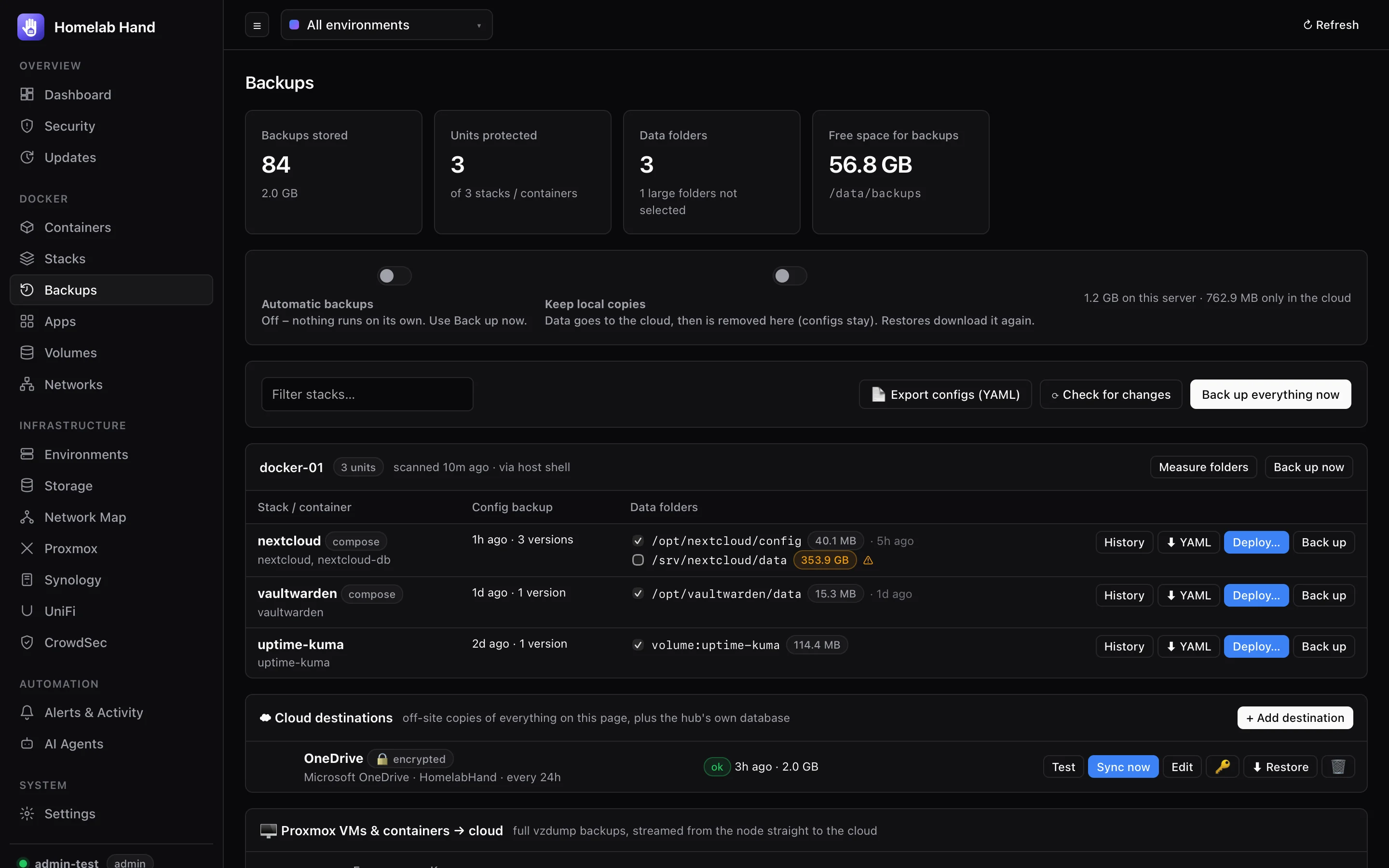
Every Compose project, or standalone container, on every Docker environment is a unit. For each one the hub keeps versioned configuration backups, and optionally backups of its data folders, which you can redeploy onto any environment.
What gets backed up
Configuration
- The original compose file(s) and
.env, each container'sdocker inspect, and a compose file generated from the running containers (for stacks whose files can't be read). - Stacks deployed by Portainer, Dockhand or Hawser are found inside those tools' data folders.
- Configs are checked every 15 minutes. A new version is stored only when something changed (compose,
.env, image, ports, env vars, mounts…). History shows which containers changed. - The last 10 versions are kept.
Data folders
- Each bind mount and named volume is measured with
du. Folders up to 1 GB are included automatically. Bigger ones show ⚠ and must be ticked by hand (the limit is configurable). - Selected folders are backed up as
.tar.gzevery 24 hours, and only if a file in them changed. A folder shared by several stacks is backed up once. The last 3 versions are kept. - The hub's own data volume is never included, because it holds the backups. Use a configuration backup for the hub itself.
Automatic backups are off by default. Press Back up now (per stack, per host or everything), or switch on Automatic backups at the top of the page to check configs every 15 minutes and back up changed data daily.
Reliability
- Each data archive is verified before it counts. A failed or interrupted attempt is cleaned up straight away, and retried at the next scheduled slot.
- On hosts reached through a helper container (e.g. a NAS via Hawser), archives are copied out in 4–6 MB pieces, so a long transfer can't be cut off part-way.
- Access is through the environment's shell (SSH, agent,
pct execor guest agent). Without one, a short-liveddocker:clihelper mounts the host filesystem read-only. For restores, only the target folder is mounted read-write. - Backups live in
/data/backupsinside the hub's volume (HUB_BACKUP_DIRto change it). Each version can be downloaded as a.tar.gz.
Deploying a backup
- Deploy…on a unit, then pick a backup version and a target environment (it can be a different one).
- Choose the composethe original or the generated one (both editable), and the
.env. - Choose datawhich data folders to restore first, and where to put them. Relative paths can be turned into the original absolute paths so the restored data lines up.
- Deployand follow the live output.
A newly connected environment with no containers gets a banner offering to deploy from a backup, which is handy when rebuilding a server.
Config exports (YAML)
📄 Export configs (YAML) saves every stack's compose file as plain YAML, as exports/<date>/<environment>/<stack>.yaml with a README. You can download it as a .zip, keep it on the server, or send it to a cloud destination. ⬇ YAML on a row downloads one stack. .env files are only included if you tick it, because they contain secrets.
Cloud destinations
Off-site copies through rclone, which is built into the image (version pinned and checksum-verified).
| Provider | How to connect |
|---|---|
| OneDrive, Google Drive, Dropbox, Box, pCloud | Press Sign in with … in the hub, from any browser including a phone. Approve access, and you land on a localhost:53682 page that can't load. That's expected. Paste that full address back into the hub. |
| Proton Drive | Username and password, plus a fresh 2FA code for the first sign-in. |
| MEGA, S3-compatible (AWS, Cloudflare R2, Wasabi, MinIO), Backblaze B2, WebDAV / Nextcloud, SFTP | The usual keys or credentials. SFTP can use the hub's SSH key. |
- Encrypted by default with rclone crypt. File contents are encrypted, but folder names stay readable (
backups/2-docker-01/sonarr/…) so you can find what you need. You can choose to hide names too. The passphrase and salt are generated, stored encrypted, and shown under 🔑. Save them: you need them to read the backups without this hub. - Each destination gets a
README.txtexplaining the layout and how to decrypt with plain rclone. - Sync every N hours, or press Sync now. Mirror deletions removes versions pruned locally.
- Keep local copies off: after every destination has a copy, data archives are removed from the server, and restores fetch them back automatically.
- ⬇ Restore downloads everything back into a hub, for example a fresh install, and rebuilds the backup list.
Proxmox VM & LXC backups
Full vzdump backups straight to a cloud destination. The node runs vzdump --stdout --mode snapshot | zstd over its SSH environment, and the stream goes through the hub into rclone rcat, so neither the node nor the hub needs disk space for it.
- Tick guests to back them up every N hours (default weekly) and keep the last N per guest, or use Back up now.
- Files are named like Proxmox's own (
vzdump-lxc-100-<date>.tar.zst), with a.jsonsidecar of the guest's config. - Restore…: pick node, storage, VMID (the next free one is suggested), new MAC addresses, overwrite (stopped guests only) and start afterwards. The archive is streamed to the node's
/var/lib/vz/dump(free space is checked first), restored withqmrestore/pct restore, then deleted.
Storage
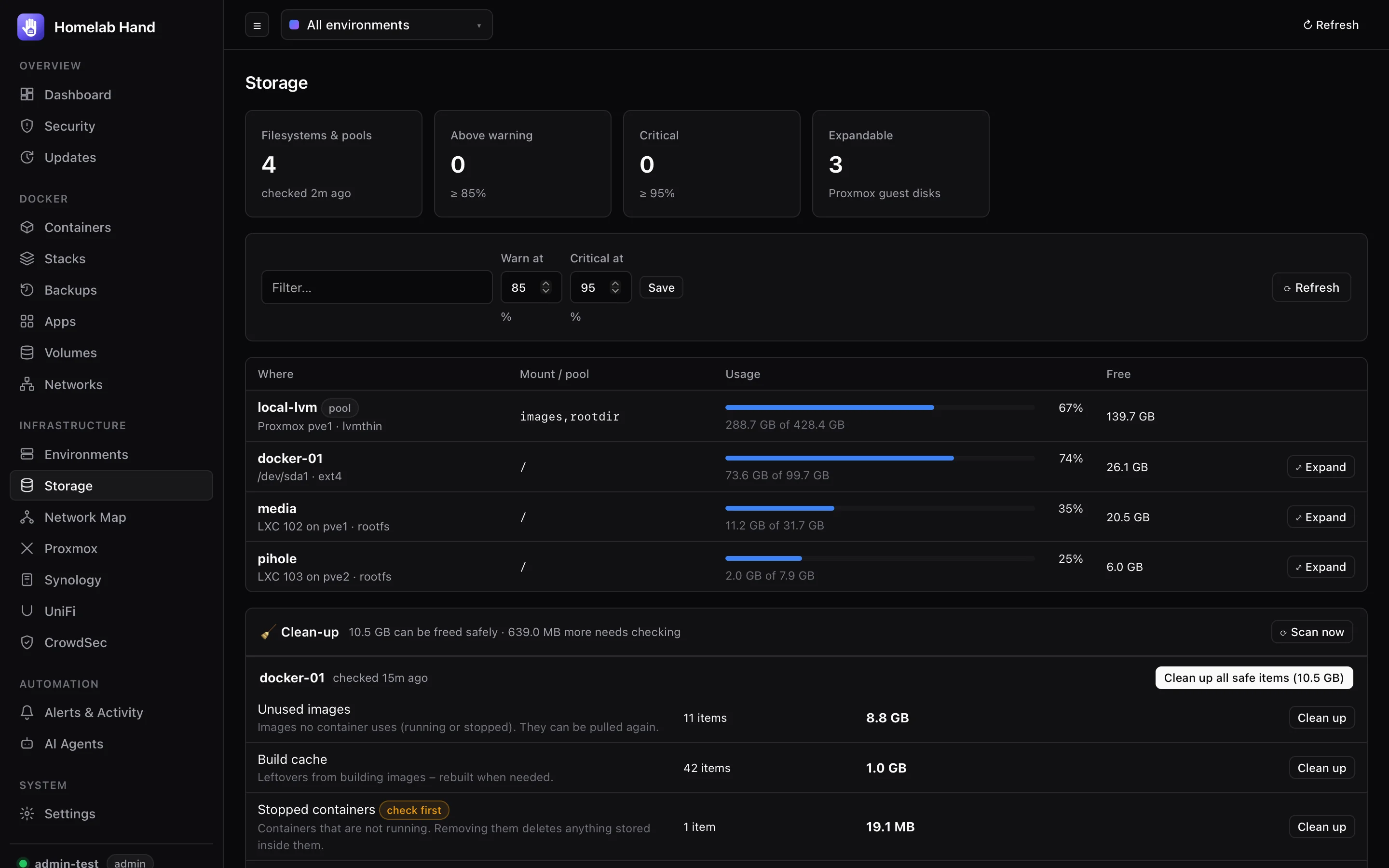
Every filesystem and storage pool in one table: Proxmox pools (local, LVM, ZFS, NFS…), df on every environment with a shell (including LXCs via Proxmox), container disks from the Proxmox API and VM filesystems from the guest agent. It's checked every 5 minutes and raises storage.high (default ≥ 85%) and storage.critical (≥ 95%). Set the thresholds on the page.
Clean-up
- 🧹 Clean-up shows reclaimable space per environment: unused images, build cache, stopped containers, unused volumes, the package download cache and the journal above 200 MB.
- Clean up all safe items removes everything safe in one go. Stopped containers and unused volumes are marked check first and are never cleaned automatically.
- Weekly automatic clean-up can be switched on per safe kind. It's off by default, and images pulled in the last week are kept for rollbacks.
- An environment with more than 10 GB reclaimable raises
storage.cleanup_suggested.
Expanding Proxmox disks
⤢ Expand on a Proxmox guest: pick the disk and how many GB to add, and the hub resizes it online through the Proxmox API. On LXCs the filesystem grows automatically. On VMs the hub then grows the partition, LVM and filesystem inside the guest (growpart, lvextend -r, resize2fs / xfs_growfs / btrfs). Disks can only grow. The token needs VM.Config.Disk and Datastore.AllocateSpace.