 Homelab Hand
 Smart Home & Siri
Control Homebridge, Home Assistant and Apple Home devices in one place – tap, or ask Siri to open the garage.
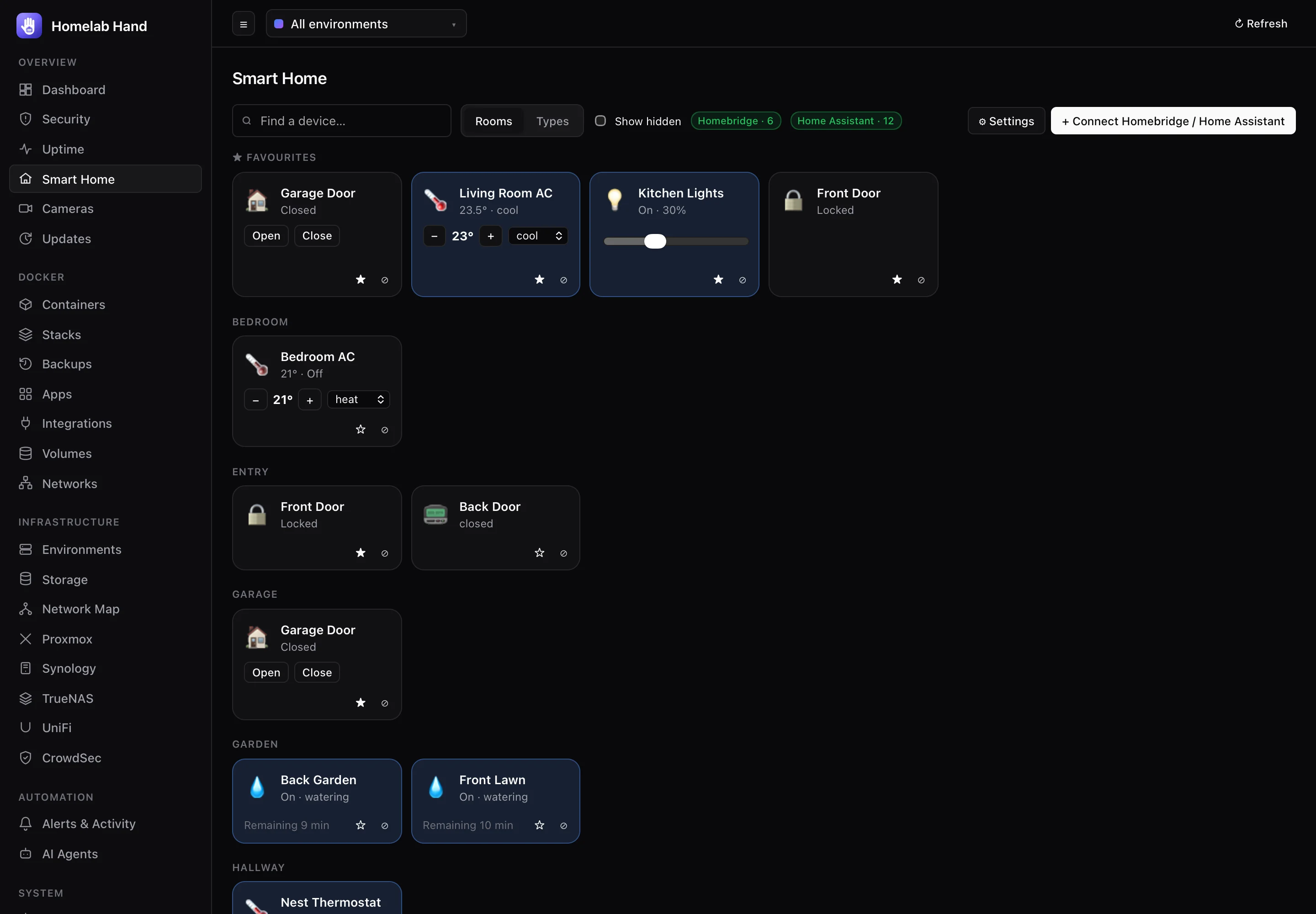
Smart Home brings the devices from Homebridge, Home Assistant and (in the app) Apple Home into one place: lights, switches and plugs, garage doors and gates, locks, air-conditioners and thermostats, fans, blinds, irrigation, TVs, vacuums, sensors and scenes. Tap to control them on the web or in the app, or just ask Siri.
Where your devices come from
| Source | How it connects | What it brings |
|---|---|---|
| Homebridge | The Homebridge UI's API, with a UI user (the hub signs in like the UI does). | Every accessory from every plugin and child bridge, with the rooms you set in the Homebridge UI. |
| Home Assistant | The REST API with a long-lived access token. | Every light, switch, cover, lock, climate, fan, media player, vacuum, valve, scene and script, plus temperature, humidity, door and motion sensors, with their areas as rooms. |
| Google Home / Nest | Through Home Assistant (its Google Nest, Google Cast and Matter integrations). | Google has no public API for controlling a Google Home from other apps. Add your devices to Home Assistant and they appear here. |
| Apple Home | The iPhone, iPad and Mac app, through Apple's HomeKit (it asks once for Home access). | Every accessory and scene in your Apple Home. Accessories that also come from Homebridge appear once. |
Connecting Homebridge
- Turn on Insecure modeIn the Homebridge UI: Settings → Startup & Environment → Homebridge Insecure Mode, save, and restart Homebridge. This lets the UI's API (and so the hub) control accessories. It doesn't open any new port, and the API still needs a UI sign-in.
- Optional: a dedicated userIn the Homebridge UI → User Accounts, add a user just for the hub. If that user has 2FA, enter a fresh code when connecting.
- Connect it in the hubSmart Home → + Connect Homebridge / Home Assistant. A Homebridge container on one of your environments is suggested under Found on your servers, with its address filled in. Otherwise use the UI's address, e.g.
http://192.168.1.20:8581. - Test connectionshows how many devices the hub found. "No accessories" means Insecure mode isn't on yet.
Rooms: arrange accessories into rooms in the Homebridge UI (Accessories page, drag them into rooms). The hub uses the same rooms.
Connecting Home Assistant
- Create a tokenIn Home Assistant, click your name (bottom left) → Security → Long-lived access tokens → Create token. Name it "Homelab Hand" and copy it (it's shown once).
- Connect it in the hubSmart Home → + Connect, type Home Assistant, address e.g.
http://192.168.1.20:8123, and paste the token. A Home Assistant container is suggested automatically.
Areas become rooms. Configuration and diagnostic entities are left out, and so are sensors other than temperature, humidity, doors/windows, motion/occupancy, leaks, smoke and gas. Use Hide (⊘) on a tile to tidy up anything else.
Using it
- Tap a tile to toggle it: lights and switches on/off, the garage open/closed, a lock locked/unlocked, a scene runs.
- Lights and fans have a brightness/speed slider, blinds a position slider, and air-conditioners and thermostats have − / + for the target temperature and a mode picker (heat, cool, auto…).
- Garage doors also have explicit Open and Close buttons, so you always know which way it will go.
- ★ Favourites appear at the top, on the web and in the app. ⊘ Hide removes a device from the page (tick Show hidden to bring it back).
- Rooms / Types switches the grouping. Search finds a device by name or room.
- States refresh every 15 seconds, and straight after you change something.
- Every change is written to the activity log (
audit.action), with who did it.
Siri
The iPhone, iPad and Mac app teaches Siri every device you have:
| Say | Does |
|---|---|
| "Hey Siri, open Garage Door with Homelab Hand" | Opens the garage. Also works for gates and blinds, and "open" a lock unlocks it. |
| "Close Garage Door with Homelab Hand" | Closes it (or locks a lock). |
| "Turn on Kitchen Lights in Homelab Hand" | Turns a light, plug, AC, fan or valve on. Scenes run. |
| "Turn off Living Room AC in Homelab Hand" | Turns it off. |
Saying just "Hey Siri, open my garage"
Siri needs to know which app you mean, so there are two ways to drop the "with Homelab Hand":
- Devices in Apple Home (including everything Homebridge publishes to Apple Home) already work with plain Siri, e.g. "Hey Siri, open the garage".
- Any device, using a shortcut: open the Shortcuts app → + → add the Homelab Hand action Open a device (or Control a device) → pick Garage Door → name the shortcut "Open my garage". Now "Hey Siri, open my garage" runs it. The same works for Home Assistant devices that aren't in Apple Home.
The shortcut actions also work from the Home Screen, the Action button, Control Center, and Shortcuts automations (e.g. "when I arrive home, open the garage").
Apple Home in the app
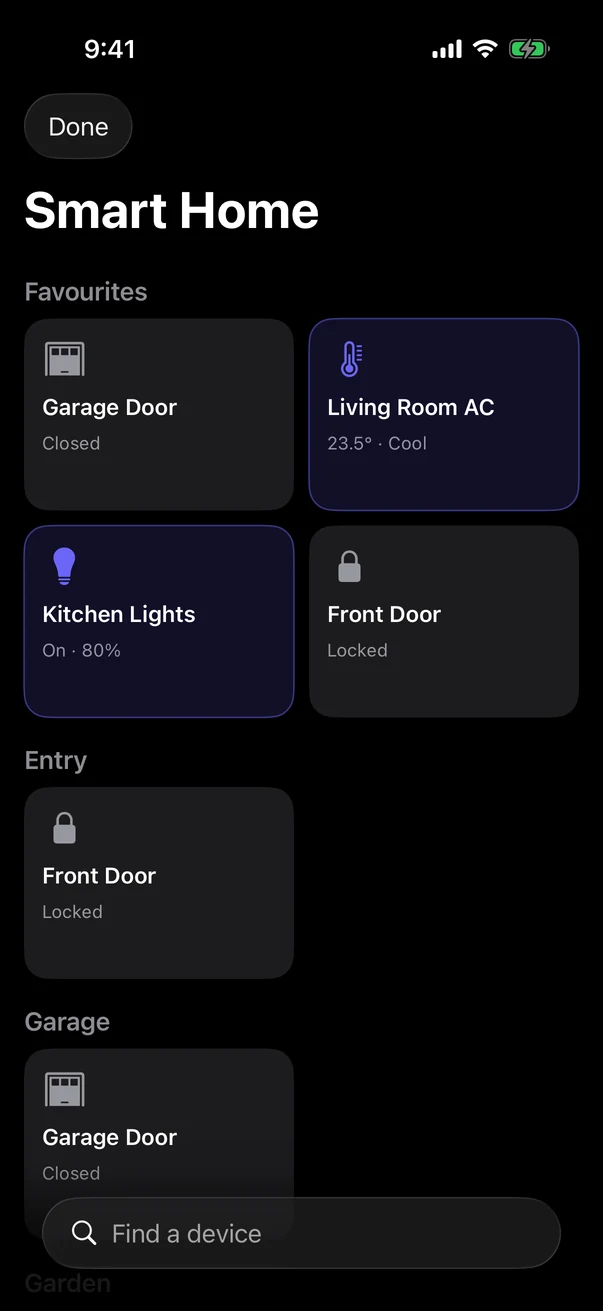
The first time you open Smart Home from the app's side menu (swipe in from the left edge), iOS asks for access to your Home data. Allow it, and every Apple Home accessory and scene appears alongside your hub devices (marked with a small HomeKit symbol). They're controlled directly by your phone through HomeKit, so they work even when the hub is offline. Apple Home only works on Apple devices, so the web hub shows Homebridge and Home Assistant devices only.
Alerts
Under Smart Home → ⚙ Settings, turn on Alert when a garage door is left open or a lock is left unlocked and choose after how many minutes (default 15). You get a smarthome.left_open alert through your usual destinations. If Homebridge or Home Assistant stops answering, you get smarthome.unreachable.
Troubleshooting
| Problem | Fix |
|---|---|
| Homebridge connects but shows no devices | Insecure mode is off. Turn it on (Settings → Startup & Environment) and restart Homebridge. |
| "Homebridge refused the username or password" | Use a Homebridge UI user, not the HomeKit setup code. If the user has 2FA, enter a current code. |
| "Home Assistant refused the access token" | Create a new long-lived token, then edit the source and paste it. |
| A device says "Not responding" | The plugin or integration lost contact with the device. Check it in Homebridge or Home Assistant. |
| Homebridge stops after updates | Give its container the restart policy unless-stopped. Homelab Hand also restarts any container that was running before an OS update, if Docker restarting left it stopped. |
| Siri doesn't know a device name | Open the app's Smart Home screen once so it can tell Siri about new devices. |