 Homelab Hand
 Security, CrowdSec & Wazuh
The security dashboard, CrowdSec blocking and management, UniFi IPS sync and Wazuh.
Security dashboard
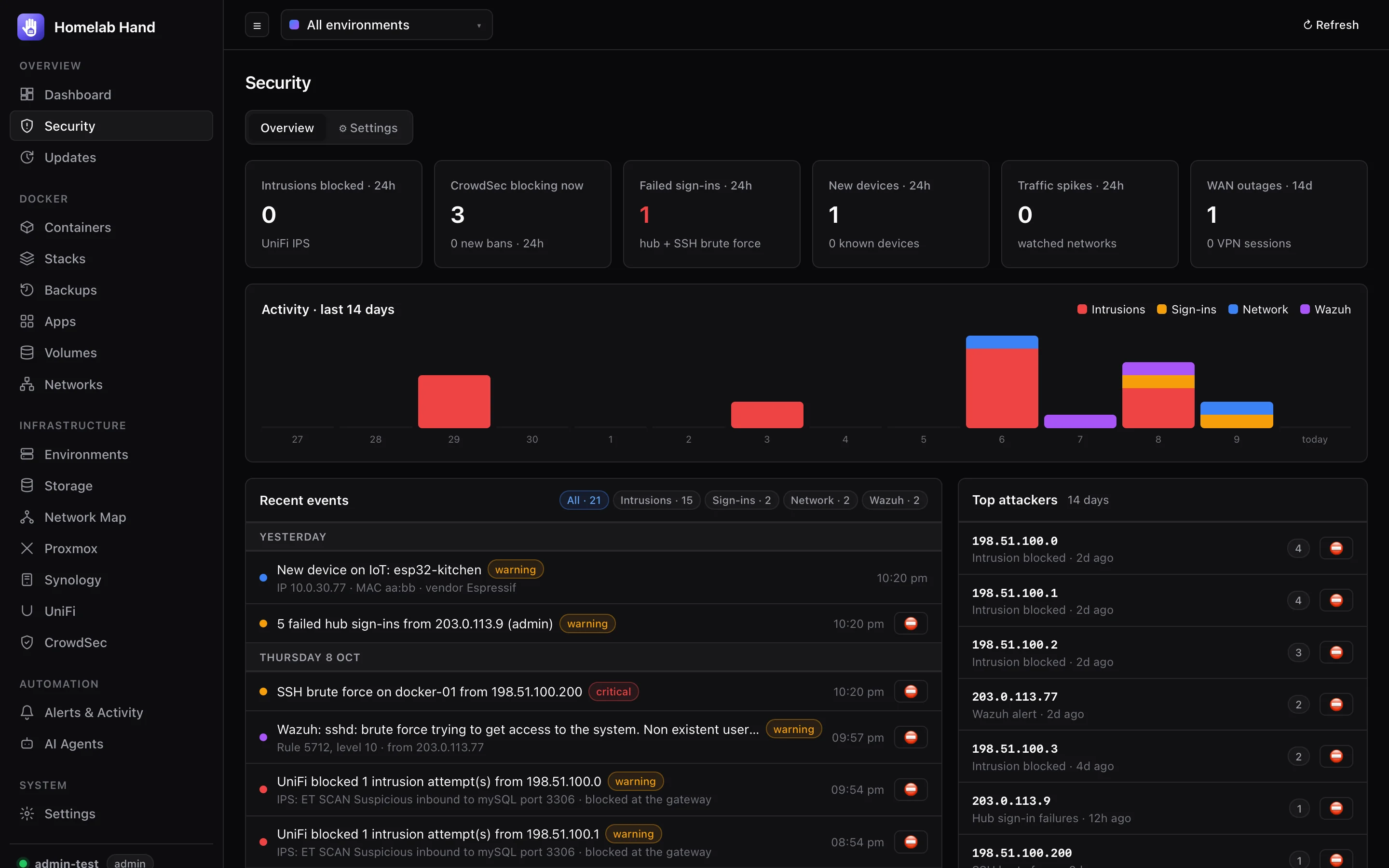
The Security page is built from every log the hub can reach. Detection runs on the integrations poll. The first run silently learns your current devices and sign-in IPs, so only new things alert. UniFi's log is backfilled for the last 7 days on the first run, and again after the hub was down for more than an hour. Backfilled entries keep their original time but aren't sent as alerts.
Detection rules
| Rule | Source | Event |
|---|---|---|
| Intrusions blocked | UniFi IPS/IDS log, grouped per source IP | security.threat_blocked |
| New device on the network | UniFi clients vs a learned baseline | security.new_device |
| Hub sign-in failures / brute force | Hub logins (5 → warning, 10 → critical) and sign-ins from new IPs | security.login_*, security.new_login_ip |
| SSH brute force / new SSH login IP | journalctl / auth.log on every environment with a shell (every 5 min) | security.ssh_bruteforce, security.ssh_login |
| CrowdSec attacks | Brute-force, exploit and CVE scenarios | security.attack_detected |
| Traffic spikes | Devices on watched networks uploading above a threshold (default 50 Mb/s) for three checks in a row. Downloads have their own threshold, off by default. Servers are skipped, and any device can be muted with 🔇. | security.traffic_spike |
| UniFi admin activity, VPN connections | UniFi audit and VPN logs | security.unifi_admin, security.vpn_connected |
| WAN down / failover | UniFi internet log | network.wan_down, network.wan_event |
Overview tab
- 24-hour and 14-day counts, and a 14-day chart with each day split into Intrusions, Sign-ins, Network and Wazuh.
- Recent events grouped by day and filterable, with ⛔ Block on events that carry an attacker IP.
- Top attackers (⛔ Block straight into CrowdSec), a compact Wazuh summary and Network (new devices, traffic spikes, watched networks).
Settings tab
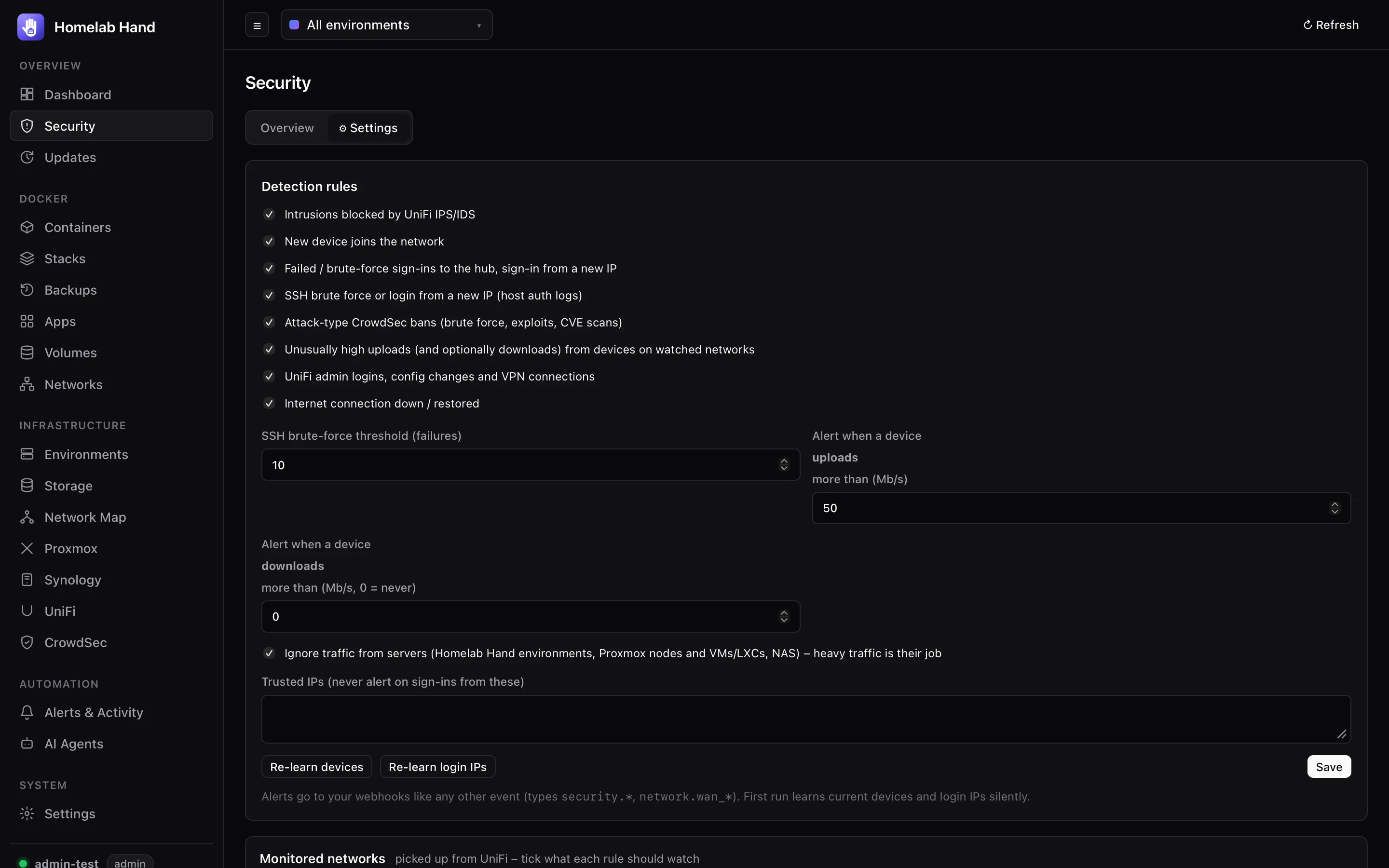
Rule toggles, thresholds, trusted IPs, Re-learn buttons, the Wazuh connection and Monitored networks. Every UniFi network is listed automatically, with switches for which ones are watched for traffic spikes and for new devices. By default, traffic watching covers networks named IoT/camera/security/guest, and new-device alerts cover all networks.
CrowdSec
Infrastructure → CrowdSec shows what CrowdSec is blocking and lets you undo or extend it.
Connecting
- Container (recommended): pick a CrowdSec container the hub found on one of your environments. The hub runs
cscliinside it, so no credentials or open ports are needed, and all the management tabs below are available. - Local API: URL plus machine credentials (
cscli machines add htech-hub --password …). This only shows decisions.
Blocked IPs and alerts
- Overview: version, connected bouncers (with their last pull), blocked-now count, top reasons and top countries.
- Blocked IPs: IP or range, country and network (AS), scenario, ban/captcha, origin, time left and events. Search across all of it.
- Unblock removes the decision. Every bouncer stops enforcing it at its next pull.
- + Allow (unblock and always allow) also adds the IP to an allowlist so it isn't banned again. Needs CrowdSec 1.6.8+.
- Select several IPs to unblock them in bulk.
- Block IP: an IP or CIDR range for 1 hour up to a year, or never expiring, as a ban or captcha, with a reason.
- Recent alerts: source, scenario, request path / user agent / log file, and whether it's still blocked, with one-click re-block.
Only local decisions are listed (from scenarios, cscli and AppSec). The community blocklist (CAPI) has thousands of entries and isn't shown.
Managing CrowdSec
With the container connection, extra tabs run cscli for you. These cover features the CrowdSec Console reserves for paid plans when used remotely, all of which are available locally on the free security engine:
| Tab | What you can do |
|---|---|
| Detection | Installed collections, parsers, scenarios, post-overflows, AppSec rules/configs and contexts, with their status (update available / modified locally). Browse the CrowdSec hub, install, upgrade, remove, and Update everything. |
| Allowlists | Lists of IPs and ranges that are never blocked, with notes and expiry (CrowdSec 1.6.8+). |
| Simulation | Globally or per scenario: alerts still appear, nothing is blocked. Good for testing new scenarios. |
| Blocklists | Import a plain-text list from a URL (e.g. FireHOL) as bans, optionally refreshed daily. Every bouncer enforces them. Also home to the UniFi sync below. |
| Bouncers & machines | Add a bouncer (its API key is shown once), delete. Validate or delete machines. |
| Metrics | Acquisition, parsers, scenarios, bouncer and Local API counters. |
| Console | Central API status, the sharing options (custom / manual / tainted / context / console management) and enrolment with a key from app.crowdsec.net. |
| Profiles | Edit profiles.yaml (remediation and ban length), and set the default ban for CrowdSec's own detections: 4 hours to 1 year, or never expire. Checked with crowdsec -t; the old file is backed up and put back if the check fails. |
Changes reload CrowdSec (SIGHUP) so they take effect straight away.
UniFi IPS → CrowdSec
Attackers your UniFi gateway's intrusion prevention blocks become CrowdSec bans too, so every bouncer (e.g. Nginx Proxy Manager or a Cloudflare bouncer) keeps them out, not just the UniFi firewall.
- Sync automatically runs every minute. It's on by default once CrowdSec and UniFi are both connected.
- Ban for 4 hours, 24 hours, 7 days, 30 days, 1 year, or never expire (the default: external attackers stay blocked).
- After 1, 3 or 10 blocked attempts.
- Sync last 7 days now bans what UniFi has already blocked. Recently banned from UniFi lists the latest.
Your LAN can never be banned. These addresses are excluded:
- private, CGNAT and link-local ranges;
- every subnet of every UniFi network, VLAN and VPN;
- your WAN address, trusted IPs and the hub's own servers.
They're checked when candidates are collected and again right before each ban. The hub also keeps a CrowdSec allowlist called homelab-lan containing all of them, created before the sync can be switched on, so CrowdSec itself refuses to ban them from any source.
Wazuh
Security → Connect Wazuh (or Connect on the detected Wazuh app). Enter:
- the manager API URL (
https://<wazuh>:55000) and an API user (thereadonlyrole is enough); - optionally, the indexer URL (
https://<wazuh>:9200) and a user that can readwazuh-alerts-*andwazuh-states-vulnerabilities-*. If the indexer only listens on localhost (Wazuh's default), it's queried by running curl on that host. Tick the option to use the passwords the installer saved.
The Security page then shows agents (active / disconnected) with each agent's CIS benchmark score, alerts in the last 24 hours by severity and hour, top rules, MITRE tactics, top source IPs (with ⛔ Block), critical/high CVEs for connected agents, and recent high-level alerts.
- Alert level (Edit): the panel only counts alerts at or above it, and says how many lower-level ones are hidden.
- 🧹 Clear alerts hides everything up to now, so only new alerts appear. Nothing is deleted in Wazuh, and Show cleared brings it back.
- Alerts at or above the rule level (default 10) become
security.wazuh_alertevents (12+ are critical). Agents that drop off becomewazuh.agent_disconnected.