 Homelab Hand
 Proxmox, Synology & TrueNAS
Proxmox nodes and guests, Synology NAS health and remote restart, and TrueNAS.
Proxmox
Connecting
- Create an API tokenIn Proxmox: Datacenter → Permissions → API Tokens → Add. Note the token ID (
user@pam!name) and secret. - Grant permissions
PVEAuditorto view everything;VM.PowerMgmtto start, stop and reboot guests;Sys.Auditfor node update counts;VM.GuestAgent.Unrestricted(PVE 9) orVM.Monitor(PVE 8) for guest-agent environments;VM.Config.DiskandDatastore.AllocateSpaceto expand disks.
- Add it in the hubProxmox → + Add Proxmox with the address (
https://pve:8006), token ID and secret.
What you can do
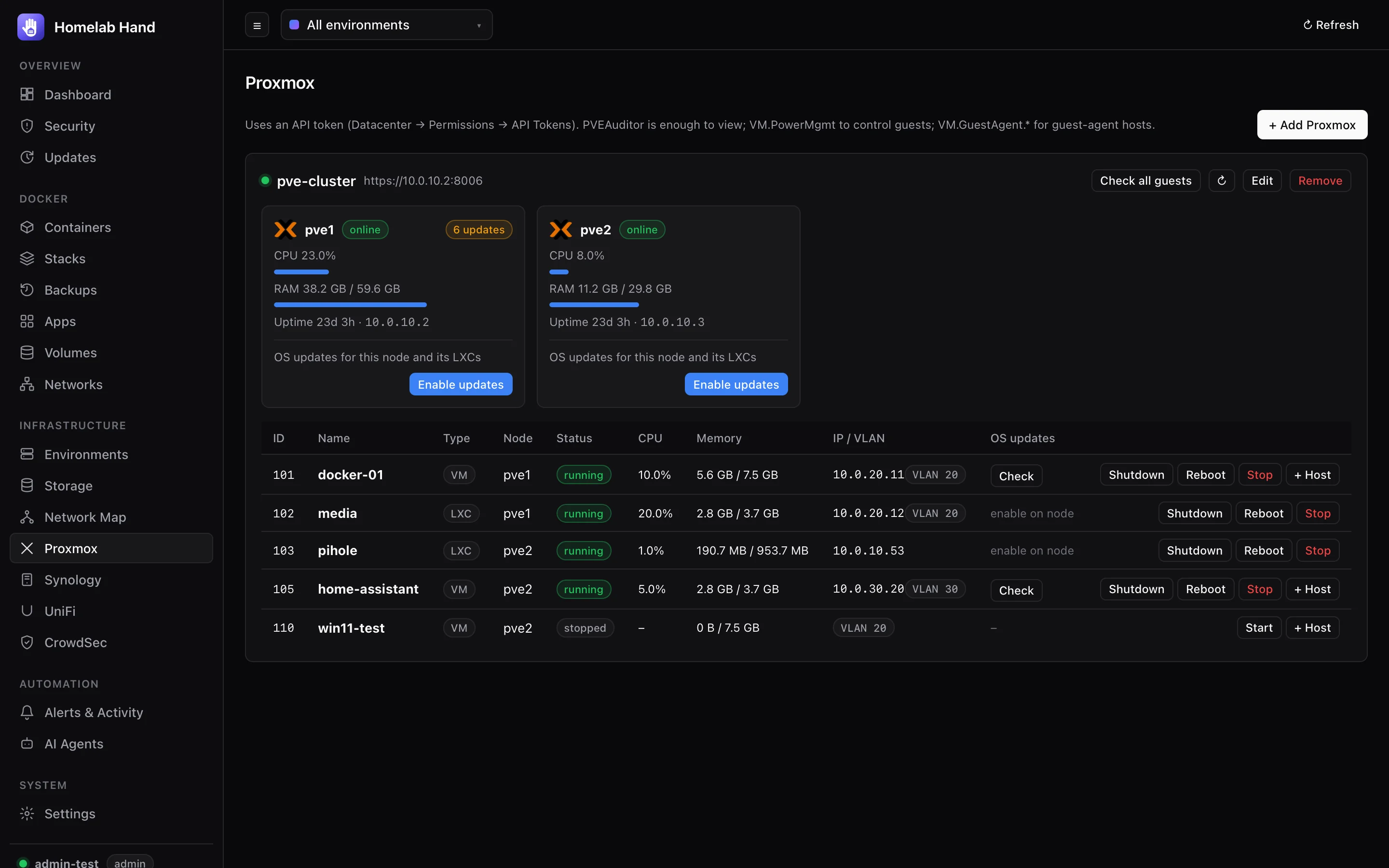
- Node cards: CPU, RAM, uptime and pending updates. Enable updates creates an SSH environment for the node (see Updates).
- Guest table: every VM and LXC with IPs and VLAN tags, plus start, shutdown, reboot and stop.
- + Host turns a VM into a guest-agent environment so you can manage its Docker.
- OS updates for LXCs (
pct exec) and VMs (guest agent), with Check all guests. - ⤢ Expand disks online and VM backups to the cloud (see Backups).
Synology
Connecting
- Use an account in the administrators group. A dedicated account is best.
- 2-step verification is supported. Enter a code once (in the form, or on the NAS card when prompted). DSM then trusts the hub as a device, so no more codes are needed unless you remove it under Personal → Security → Trusted devices.
- Secure SignIn push approvals can't be answered over the API, so keep an authenticator (OTP) method enabled on that account.
What it shows
Model, DSM version, uptime, temperature, CPU/RAM, volumes (usage and status), disks (status and temperature) and DSM update availability. Alerts include synology.volume_degraded, synology.disk_unhealthy, synology.temperature_high, synology.volume_full and synology.update_available.
Certificate pinning
With Verify TLS certificate off (DSM's self-signed certificate), the certificate is pinned on the first connection, and its SHA-256 is shown in the NAS settings. If the NAS later presents a different certificate, the hub refuses to connect. The check happens during the TLS handshake, so your DSM password is never sent to an impostor.
- DSM renews its self-signed certificate every year. With SSH set up (below), the hub asks DSM over SSH which certificate it serves. If that matches the new one on the network, it's accepted automatically (
synology.cert_renewed). A mismatch is refused (synology.cert_changed). - You're told 30 days before the certificate expires (
synology.cert_expiring). - Replaced the certificate yourself? Tick Forget the saved certificate, and the new one is pinned on the next connection. Changing the NAS address also forgets it.
Remote restart over SSH
For a NAS that sometimes hangs: still on the network, but DSM, Docker and file sharing stop responding.
- Turn on SSH in DSMControl Panel → Terminal & SNMP → Enable SSH. A non-standard port is fine.
- Tick "Let the hub restart this NAS over SSH"in the NAS settings in the hub. Enter the SSH port.
- Choose the accountThe DSM account the hub already uses is the default. You can give a separate account just for SSH (it must be in the administrators group), so the DSM API account can't log in to a shell.
- Test SSHThe SSH host key is pinned on first connection; the connection is refused if it changes.
- The card gets Test SSH, Restart (normal reboot) and Force restart (flushes the disks, then reboots immediately; for when it's hung).
- Restart it automatically when it hangs: when DSM hasn't answered for 15 minutes (configurable) but SSH still does, the hub sends a normal restart. If the NAS hasn't restarted 4 minutes later, it forces it. This happens at most once every 6 hours, and never while the NAS is still starting up. Each step raises an alert (
synology.auto_restart,synology.restart_failed,synology.recovered). - If SSH doesn't answer either, nothing can be done remotely, and you get an alert asking for a power-cycle.
Alerts about the NAS are retried if a notification service is briefly unreachable. If one still can't be delivered, a notify.failed entry appears in the event log, so a missed alert never goes unnoticed.
TrueNAS
Off by default. Switch it on in Settings → Modules → TrueNAS, then use TrueNAS → + Add TrueNAS with the address and an API key (TrueNAS → user menu → API Keys). The hub only reads data, so a key for a user with the read-only admin role is enough. The default self-signed certificate works with Verify TLS off.
- Versions: TrueNAS SCALE / Community Edition 22.12 and later. The hub uses the JSON-RPC API at
/api/current(25.04+) and falls back to the older/websocketprotocol. - Shows: version, model and uptime; pools with health, usage and scrub/resilver; disks with model, size, pool and temperature; active TrueNAS alerts; apps and app updates; available TrueNAS updates.
- Alerts:
truenas.pool_degraded,truenas.pool_full,truenas.disk_hot,truenas.alert,truenas.update_available,truenas.unreachable.